Inbox, sent, archive, search, rich compose, attachments, PDF/image/text previews, and mailbox scoping.
OmniDock
Open-source email operations for Cloudflare Workers, Email Routing, Email Sending, D1, R2, Gmail sync, and external IMAP/SMTP accounts.
Run your own private support inbox, multi-domain routing panel, external email sync, R2 file manager, contacts, signatures, logs, previews, uploads, and OCR-ready search from one Cloudflare-native Worker app.
omnidock@edge
workers.dev
$
omnidock status --mailboxes --bucket
- Runtime
- Worker
- Storage
- D1 + R2
- Mode
- Self-hosted
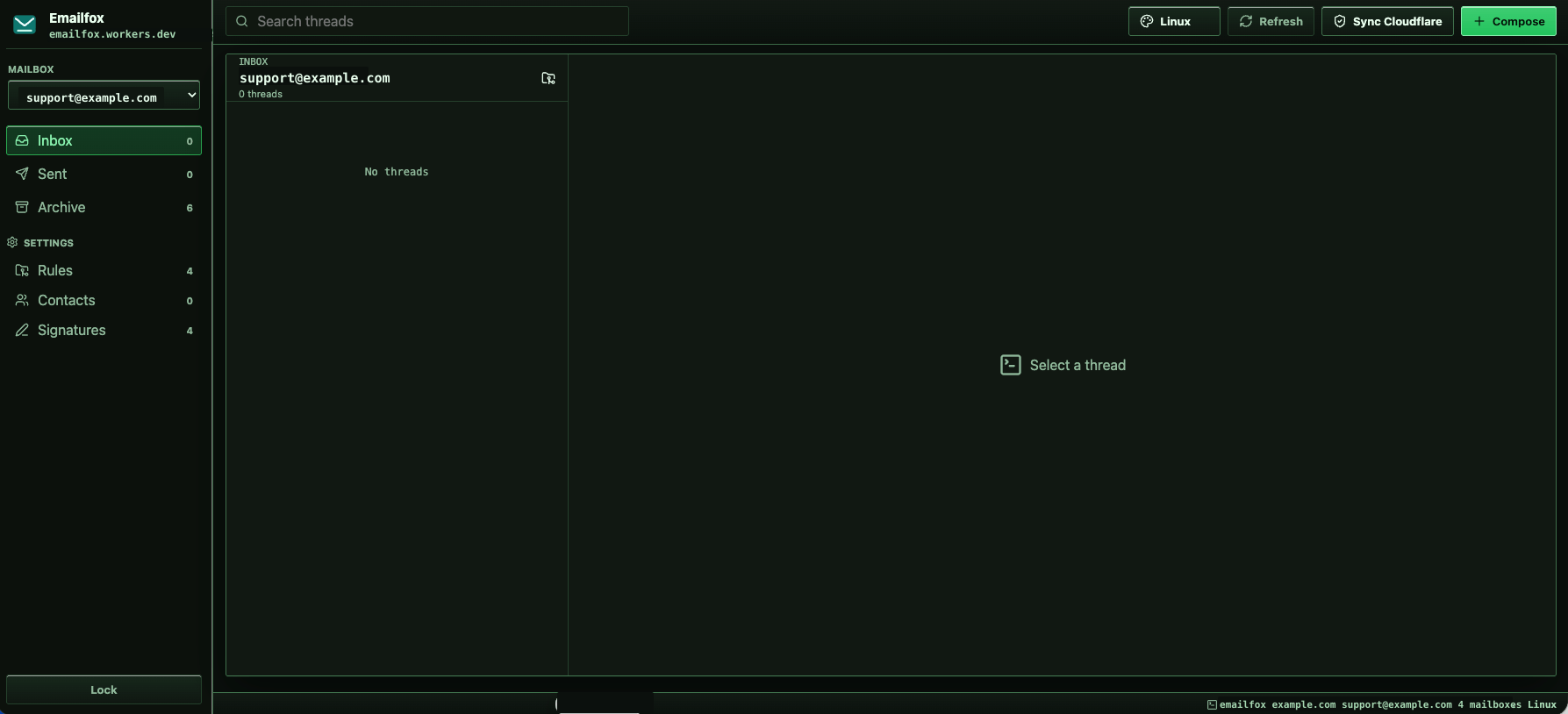
Inbound mail through Worker email handlers
D1 threads plus R2 file storage, MIME bodies, attachments, and previews
Mailbox rules, catch-all routing, contacts, signatures, external profiles, and audit logs
$ whatis omnidock
A Cloudflare-native operations dock, not a hosted mailbox suite.
OmniDock connects the primitives you already own: Workers, Email Routing, Email Sending, D1, R2, Worker secrets, cron jobs, and static assets. It gives technical teams one compact place to operate domain email, support mailboxes, external inbox metadata, storage, previews, and logs.
product boundaries
self-hosted
is
Cloudflare Workers email dashboard
is
R2 bucket and attachment manager
is not
Gmail replacement or IMAP server
is not
Hosted SaaS inbox with shared data
$ omnidock modules --list
Mail ops, not another giant mailbox.
OmniDock is built for private support inboxes, project domains, catch-all workflows, and lightweight operations that already live on Cloudflare.
Rules
Sync zones, Email Sending, Email Routing, catch-all state, and mailbox routing rules from one settings surface.
Contacts
Manual entries, CSV/TXT/VCF imports, phone, company, tags, notes, edit flow, and import reports.
Signatures
Mailbox-specific rich signatures with style, links, colors, preview, and automatic compose insertion.
R2 Files
Manage the configured R2 bucket like a file dock: browse folders, upload files, preview supported objects, download, and delete.
Profiles
Document Gmail, Outlook, Yahoo, iCloud, or custom IMAP/SMTP metadata while credentials stay in Worker secrets.
$ wrangler bindings inspect
A Worker-first architecture with room to grow.
OmniDock receives mail through a Worker email handler, stores thread metadata in D1, saves raw MIME and attachments in R2, sends through Cloudflare Email Sending or external SMTP, and keeps credentials in Worker secrets.
Inbound
Email Routing
Core
Worker
Metadata
D1
Files
R2 Storage
Outbound
Email Sending
wrangler.jsonc
binding-safe
{
  "main": "src/worker.ts",
  "assets": { "binding": "ASSETS" },
  "d1_databases": [{ "binding": "DB" }],
  "r2_buckets": [{ "binding": "MAIL_BUCKET" }],
  "send_email": [{ "name": "EMAIL" }]
}
$ omnidock buckets --preview --index-ready
R2 is part of the product, not a hidden attachment drawer.
The Buckets area treats MAIL_BUCKET as a file dock for raw mail, attachments, and manual uploads. Extra buckets can be exposed through OMNIDOCK_EXTRA_R2_BUCKETS while the UI shows readable bucket names instead of noisy binding details.
r2 file manager
MAIL_BUCKET
/mail/raw/
Raw MIME, preserved for audit and reprocessing.
/attachments/
PDF, image, and text previews with download/delete.
/manual/
Upload progress, prefix browsing, breadcrumbs, and path search.
/indexes/
OCR-ready saved text index for scanned PDFs and images.
$ install --fork-first --preserve-bindings
Fork first, bind deliberately, then ship.
The upstream README is explicit: fork OmniDock before deploying so your Cloudflare settings, bindings, and future updates stay under your control.
-
1
Fork the repository
Keep deploy settings, update flow, and sensitive Cloudflare configuration under your own GitHub account.
-
2
Create Cloudflare resources
Create one D1 database, one primary R2 bucket, Email Sending, and Email Routing before the Worker deploy.
-
3
Set build variables
Use
OMNIDOCK_D1_DATABASE_IDandOMNIDOCK_R2_BUCKET_NAMEso updates do not remove bindings. -
4
Finish setup in the app
Add admin password, primary domain, API token, mailboxes, routing rules, external profiles, and R2 bucket labels.
deploy command
npm run build
node tools/deploy-preserving-bindings.mjs
Avoid bare npx wrangler deploy for normal Git updates. OmniDock generates deploy config from build variables so D1 and R2 stay attached for mail, attachments, and the file browser.
$ security notes --self-hosted
Private by default, honest about the edges.
OmniDock stores secrets in Worker secrets, keeps passwords hashed in D1, and avoids baking personal domains, account IDs, bucket names, or API tokens into the public template.
Admin password is stored as a salted PBKDF2 hash.
Cloudflare API tokens and external account credentials belong in Worker secrets.
Sending is limited to enabled D1 mailbox addresses on verified domains.
Larger public SaaS deployments should replace sessionStorage auth with HttpOnly sessions and CSRF protection.
$ worker extend --next
Docs are first-class because setup has sharp edges.
The guide separates build-time binding variables from runtime secrets, explains mailbox rules versus catch-all routing, and documents why normal Git deploys should use the binding-preserving deploy command.
Run your domain mail from the edge.
OmniDock is MIT-licensed, TypeScript-based, and built around Cloudflare Workers, D1, R2, Email Routing, and Email Sending.